Wildcard and Broad Resource Scope in IAM Policy Statements
Narrow both actions and resources to stop convenience from becoming permanent security gaps.

Summary
Narrow both actions and resources to stop convenience from becoming permanent security gaps.
Wildcard and broad resource scope in IAM policy statements are usually products of convenience. Fixing them requires separating two questions that broad grants blur together. What may a workload do, and which resources may it touch? Explicit actions limit capability, while specific resources restore containment. Both need guardrails that keep deployment shortcuts from becoming permanent access.
Why wildcard IAM policies are so common despite being well-understood as dangerous
Wildcard policies are often flagged as bad practice, but they are still common in production. The contradiction is easier to explain than to excuse. A developer can use "Resource": "*" instead of looking up specific resource names or debugging a permission error. The application works, the deadline passes, and the policy stays.
AWS examples often use wildcard resources to keep things simple, and teams copy them without changing the resource restrictions for production. Roles for Lambda, EC2, and ECS get access across resources so that services can run without teams having to change the policy again and again. As those services grow, the roles can reach unrelated databases, secrets, and storage.
Some broad grants even look carefully scoped. A resource-name pattern with a wildcard after a bucket prefix names that prefix. But it also matches buckets added later under that prefix, so access grows without anyone changing the policy. The asterisk is a small character with an excellent expansion plan.
The two wildcard dangers are not the same problem and don't have the same fix
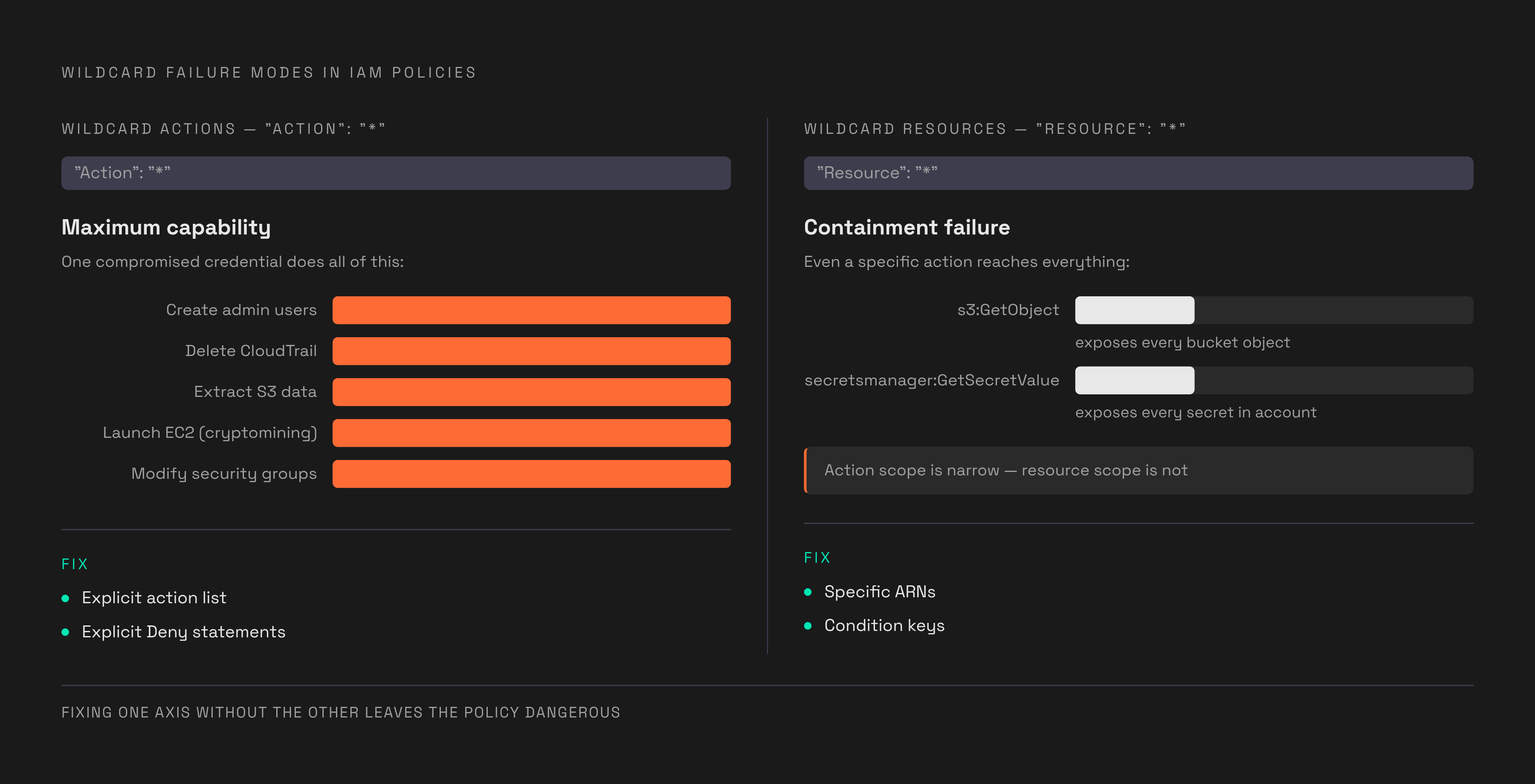
Wildcard actions create a maximum-capability problem. An "Action": "*" grant leaves the action side unrestricted, making the resource scope and other applicable controls especially consequential. Where effective permissions allow it, a compromised credential can create administrator users, delete CloudTrail logs, extract S3 data, launch EC2 instances for cryptomining, and modify security groups. A service wildcard is narrower, but not necessarily safe. s3:* includes s3:DeleteBucket and s3:PutBucketPolicy, capabilities most workloads never need.
Wildcard resources create a different failure of containment. Even a specific action can be dangerous when it applies everywhere. s3:GetObject with "Resource": "*" grants reads across objects in every bucket. Likewise, unrestricted secretsmanager:GetSecretValue can expose database passwords, API keys, third-party credentials, and developer-stored access keys.
Privilege escalation can connect these failures into a single chain. A principal allowed to use iam:CreatePolicyVersion across managed policies can write a new policy version and make it the default, replacing existing restrictions with wildcard action and resource grants. That is more than excessive access to data. It is permission to rewrite the terms of access. Remediation must therefore remove unnecessary capabilities and constrain their targets, rather than treating the removal of any asterisk as a completed repair.
How bad real-world overprivilege actually is, as measured in production applications
Permissions on the Loose: Measuring Overprivilege in Real-World Serverless Applications found a vast gap between granted and used permissions in deployed AWS Lambda applications. Applications held hundreds of permissions on average while using only a handful. The mismatch was measured in orders of magnitude. Global policies that covered all functions led to much higher overprivilege ratios than policies written for each function, showing how excess access was tied to the way permissions were shared.
The study also identified unnecessary permissions that could support privilege escalation and defense evasion. These were not merely unused entries with no security consequence. They were latent attack paths in deployed applications, available despite having no observed role in normal operation. In the measured applications, excess authority was part of the operating baseline.
What happens when these policies meet a real incident
AWS inadvertently added s3:GetObject to AWSSupportServiceRolePolicy in December 2021. The intended change supported HeadObject for S3 metadata. The resulting permission expanded what the role could read. This was a vendor-managed policy. Its change illustrates how resource access can widen without an application team deliberately requesting broader data permissions.
The Amazon Bedrock AgentCore Starter Toolkit exposed a different source of excess authority. Its default IAM roles granted overly permissive access across AgentCore resources within an AWS account’s region, with wildcard resource grants involving AgentCore and ECR. This was not unrestricted access to every AWS service. Within the affected scope, however, potential attackers could extract proprietary ECR images, access other agents’ memories, invoke every code interpreter, and obtain sensitive data.
The toolkit’s auto-create logic put ease of deployment ahead of least privilege. The convenience decision had moved into infrastructure provisioning. Following disclosure, AWS updated its documentation to say that policies created by the AgentCore CLI were designed for development and testing and were not suitable for production environments. The IAM over-permissioning finding, described as “God Mode,” must also be distinguished from the separate S3 ownership-verification flaw in the same toolkit. That separate flaw received the security bulletin and vulnerability identifier.
Why AI agents make wildcard IAM policies a materially different problem than they were for human users
Across engineering, product, finance, and sales workflows, agents receive whatever IAM role their runtime was provisioned with. They use it continuously and automatically. The permissions may be familiar, but the operator is different. Human hesitation is not an enforceable security control.
For an agent runtime interacting with Bedrock, S3, and other AWS services, a wildcard-scoped role becomes a high-value target for supply chain compromise. A compromised agent can reach everything its effective role permits, at the speed at which the agent operates. Roles made by toolkits add to that risk because they make broad access easy to deploy. Auto-provisioning is the new copy-paste, with fewer keystrokes between an example and production.
The practical consequence is that static IAM cleanup cannot stand alone. Organizations need to discover their running agents, monitor approved AI traffic, detect anomalous behavior, and enforce rules on what agents may do. Those controls cannot depend on an agent noticing a problem and asking for help. Runtime visibility and enforceable restrictions are prerequisites for safe deployment, because the next action need not wait for a person to review the previous one.
Remediating overbroad action scope: replacing wildcard actions with specific, scoped grants
The action-scope repair begins with the workload’s actual behavior. Teams should replace "Action": "*" and service-level grants such as s3:* with explicit action lists for the operations the workload uses. Read, List, Write, and Permissions Management are access-level categories that help teams judge the risk of those actions. A read requirement does not justify policy-management authority.
Delegation needs its own close inspection. Teams should restrict iam:PassRole to the specific roles that the principal needs to pass to AWS services, because misuse can provide a direct privilege escalation path. Explicit Deny statements for iam:DeactivateMFADevice, organizations:LeaveOrganization, and cloudtrail:StopLogging prevent broader Allow grants from authorizing those operations while the denies remain applicable.
A separate guardrail should limit how far an identity’s permissions can expand. Permissions boundaries and AWS Service Control Policies set maximum permissions even when an identity-based policy grants more. Permissions boundaries are especially useful when developers can create roles on their own through self-service. Organizational guardrails extend this logic across accounts, restricting actions such as disabling logging, creating public resources, or deploying workloads in unauthorized regions. Azure Policy at the Management Group level and GCP Organization Policies give organizations the same kind of control in those environments.
Remediating overbroad resource scope: replacing Resource wildcards with specific ARNs and conditions
Teams should replace "Resource": "*" on data-extraction-capable actions such as s3:GetObject, ssm:GetParameter, secretsmanager:GetSecretValue, dynamodb:GetItem, and the rds:*Snapshot action family with the relevant resource ARNs where supported. The distinction is concrete. Even with the right action name, a workload that reads an application’s secret should have access to that secret alone.
For S3, the scoped policy uses arn:aws:s3:::specific-bucket/* for objects and the bucket ARN itself for applicable bucket operations. Parameter Store access can use arn:aws:ssm:region:account-id:parameter/myapp/*, but Secrets Manager access should use the specific secret’s ARN in place of a path wildcard. DynamoDB grants should name the table and include its index ARNs when index access is needed. Each grant follows the resource that its action addresses. Combining different resource types under one broad wildcard saves typing by discarding the distinction the policy needs.
Conditions add another layer when an ARN is not precise enough. Teams can use applicable keys including aws:ResourceTag, aws:PrincipalOrgID, s3:prefix, dynamodb:LeadingKeys, and aws:SourceVpc to constrain access further. A legitimate need to read a bucket does not imply a need to reach it through every network path. Using resource tags in the same way across buckets, tables, and other data stores can also limit access based on the environment and how sensitive the data is.
Teams should review prefix wildcards for unintended inclusion of future resources, including bucket names that happen to join an existing namespace. Giving each service or application component a role scoped to its own data removes the shared-role pattern in which unrelated workloads inherit one another’s access.
How to find wildcard policies at scale without breaking production
The strongest objection to reducing permissions is operational. A policy can be visibly excessive while its safe replacement remains unclear. IAM Access Analyzer helps close that gap by generating fine-grained policies from activity captured in CloudTrail logs. Observed access gives teams a concrete starting point for replacing broad grants, rather than asking them to reconstruct every requirement from memory. It does not eliminate the need for review.
The analysis window imposes an important limit. An infrequent disaster recovery operation may be absent from the observed activity even though the role still needs it. Before using generated policies, teams should check them against operations they know run only from time to time. Netflix’s open-source Repokid offers another route to automated reduction, using Access Advisor data supplied through Aardvark to remove permissions for unused services. Its evidence source is distinct from CloudTrail-based policy generation.
Checks before deployment help keep new wildcards from taking the place of repaired policies. Teams can integrate Access Analyzer custom policy checks into CI/CD pipelines to trigger approval workflows before policies are attached. Static analysis can flag wildcard actions, wildcard resources, and privilege escalation paths while changes are still being authored. Checkov’s CKV_AWS_108 rule targets wildcard resources on data-exfiltration actions in Terraform. Pairing continuous infrastructure-as-code checks with Access Analyzer findings covers both authored configuration and deployed access.
For AI agents, deployment review is only the beginning. Runtime monitoring must detect anomalous behavior and policy violations as well as keep a record that teams can investigate later. An agent can make another API call before the next round of human review. Its permissions and runtime controls must already define what that call is allowed to do.


