Terraform State File Exposure and Cloud Credential Harvesting
Terraform state files store unencrypted cloud credentials by design.

Summary
Terraform state files store unencrypted cloud credentials by design.
Terraform state is a full attribute database. Every time a resource gets created or updated, the provider hands back a set of attributes, and Terraform writes down all of them so it can later compare what exists against what the configuration says should exist. Skip that step and Terraform loses the ability to compute a diff. Without a diff, it cannot plan anything at all.
That requirement settled the plaintext question a long time ago. HashiCorp engineers addressed it directly in 2014, in issue #516 of the Terraform GitHub repository, and the answer has not moved since: encrypting individual fields inside the backend would break the plan and apply cycle that makes Terraform useful. Plaintext storage is a load-bearing part of how the tool works, not an oversight waiting for a patch.
The JSON makes the mechanics plain to see. The resources[] array holds instances[].attributes entries, and every attribute the provider returned lands in there with no distinction between a hostname and a secret. An aws_iam_access_key resource stores the secret access key in plaintext. An aws_db_instance resource stores its legacy password field without encryption in state, though Terraform 1.11+ offers a write-only password_wo argument that is never persisted to state, and a tls_private_key resource writes the full private key in state, though an ephemeral variant introduced in v4.1.0 avoids persisting it. Those newer options are opt-in. Most existing configurations do not use them.
None of this is exotic. Cloud APIs routinely hand back the sensitive material state is built to record, things like initial database passwords, IAM secret keys, private certificates, API gateway tokens, and third-party client secrets, and Terraform writes every one of them into state because that is the job. A mid-size deployment's state file becomes the densest credential artifact in that cloud environment, spanning the cloud provider, the database layer, and whatever third-party services got wired in along the way. That density is the whole story for what follows: a file this valuable will get targeted, and the question is whether the controls placed around it actually hold up.
What the sensitive = true flag and backend encryption protect against (and what they do not)
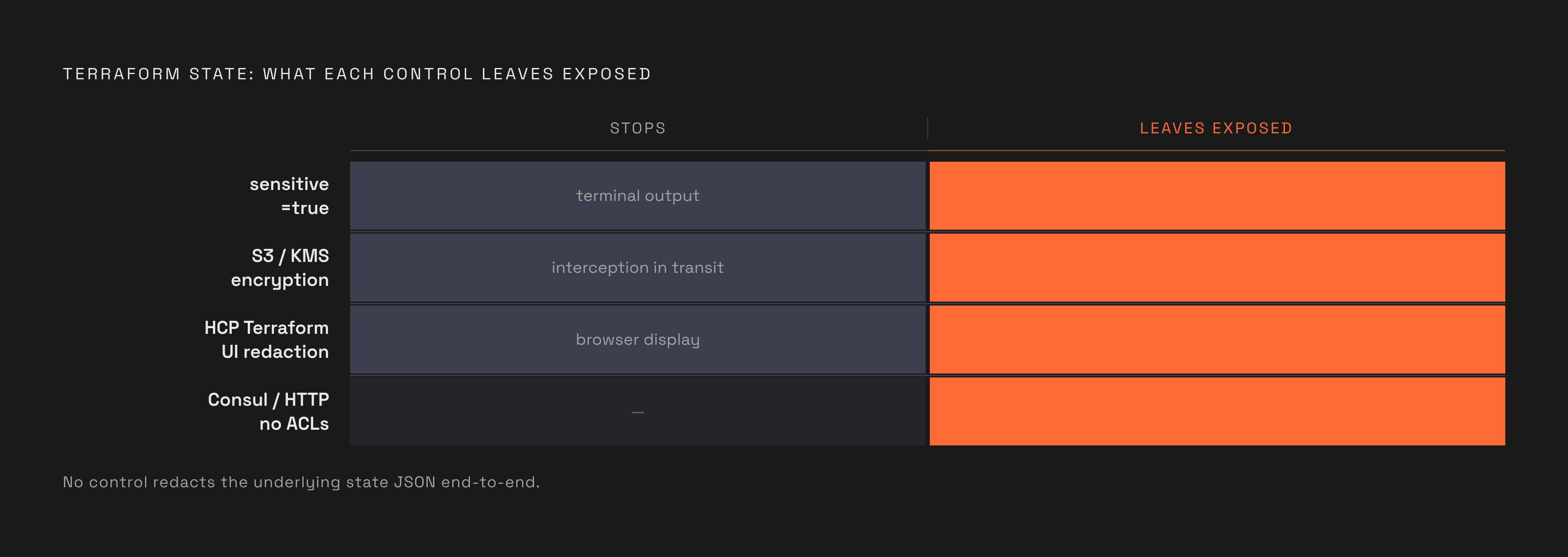
Start with sensitive = true. HashiCorp's own documentation states that sensitive values are stored in both the state file and the plan file, and anyone with access to those files can read them in plaintext regardless of the flag. The flag changes what shows up in the terminal during plan and apply, and it changes what the HCP Terraform UI displays. It changes nothing about what gets written to disk. Running terraform output -json against any state file returns the real value in the clear, flag or no flag. Set it anyway, for the sake of not broadcasting secrets across a shared terminal, but treat it as tidiness rather than protection.
Backend encryption carries the same gap between appearance and function. Configuring an S3 backend with encrypt = true and SSE-S3 or KMS stops someone from intercepting the file while it sits on disk or moves across the wire. It does nothing about who is allowed to ask for that file in the first place. A bucket with a permissive policy, or with block-public-access turned off, still hands over fully encrypted state to anyone who sends the right HTTP GET request, because decryption happens transparently once access is granted. The encryption layer never enters the picture. Encryption at rest also has nothing to say about a user with legitimate but excessive permissions, a credential stolen from the Terraform API itself, or a monitoring tool that pulls the decrypted JSON into a log aggregator or a dashboard where it sits in plaintext for anyone with read access.
HCP Terraform's own redaction gets misread the same way. The workspace web interface hides sensitive outputs from view, but the state JSON underneath stays complete, and pulling state through the API returns every value unredacted. A public HCP Terraform workspace exposes state via a predictable API endpoint, /api/v2/workspaces/:id/current-state-version-outputs, which still requires a valid bearer token for authentication. That token requirement matters, but it is an authentication check, not a redaction feature, and it is easy to conflate the two.
Two other backend choices turn into open credential stores by default rather than by misconfiguration in the usual sense. A Consul backend running without ACLs enabled will hand state back through GET /v1/kv/terraform/<workspace> as a base64 blob, and Shodan already indexes exposed Consul UIs for anyone curious enough to search. A generic HTTP backend running without authentication returns the complete state JSON to any GET request against its configured endpoint, and the only trail left behind is whatever the server itself happens to log. Neither setup requires a mistake beyond skipping a step most people assume is optional.
How attackers locate and extract state files undetected
The main way attackers get at state files is by looking for them out in the open, not by breaking in. Finding live credentials in a Terraform state file does not require the attacker to hold any credentials at all, and it does not produce the kind of signal that security teams have built their alerting around.
S3 bucket enumeration is the clearest case. Guessing bucket names requires no credentials whatsoever and produces no GuardDuty findings, because S3 has no anomaly detection built for unauthenticated enumeration against buckets that are already public. The method itself is almost clerical: scrape crt.sh for subdomains belonging to the target organization, extract the base names, and generate permutations like {name}-terraform-state, {name}-tfstate, or terraform-{name}-prod. Sending HEAD requests at a modest pace reveals which buckets are publicly accessible. Access logs only capture any of this if logging happens to be turned on for that bucket, and a bucket left public in the first place is frequently a bucket with logging left off too, so the same misconfiguration hides both the exposure and its exploitation.
GitHub search works the same way, minus the guesswork. The dork filename:terraform.tfstate surfaces files committed straight into public repositories, and adding aws_access_key_id to the search narrows results down to files where a credential has actually been confirmed. Deleting a file and adding it to .gitignore afterward does not remove it from history. Running git log --all --full-history -- '*.tfstate' against any clone, including a fork made after the deletion, pulls the file straight back out.
Purpose-built tools have started automating the whole hunt. MAGO Intel scans for S3 buckets and HCP Terraform workspaces that expose state publicly and extracts credential patterns directly from the tfstate JSON it finds. None of this demands custom exploit development or a foothold inside the target's network.
A single successful read of a state file hands over more than one secret. IAM keys belonging to CI/CD service accounts tend to carry broad permissions, simply because broad permissions are the fastest way to get a pipeline running without fighting least-privilege policy all week. Database endpoints and passwords sit next to private IP addresses and internal resource IDs, and together they amount to a full reconnaissance map of the target's infrastructure. That map tells an attacker which systems are worth the effort and which ones look under-defended, turning a passive discovery into a targeted campaign instead of a blind credential-stuffing attempt.
Real incidents where state file exposure translated into infrastructure compromise
None of the mechanisms above are theoretical. Each has already played out against organizations that had security programs in place, across different entry points, and the same underlying pattern appears in every case.
The clearest case is the Private-CISA leak tied to a Nightwing contractor. From November 13, 2025 through May 15, 2026, a public GitHub repository called "Private-CISA" exposed 844 megabytes of CISA's internal DevSecOps infrastructure, including administrative credentials for three AWS GovCloud servers, Kubernetes manifests, GitHub Actions workflows, ArgoCD application files, Terraform code, Entra ID SAML certificates, and plaintext passwords. One file inside the repository, labeled "importantAWStokens," held administrative credentials that stayed valid for roughly 48 hours after the repository itself went offline, leaving a live window for exploitation even after the leak had been found and shut down. Exposed Artifactory credentials raised a further possibility: an adversary holding those credentials could have pushed malicious code straight into CISA's internal build pipeline. The contractor responsible had disabled GitHub's default secret-scanning push protections, and a good share of the exposed credentials followed the same lazy pattern, platform name plus current year. GitGuardian researcher Guillaume Valadon identified the repository on May 15, 2026; it had been publicly accessible since at least November 13, 2025. Note what the exposure vector actually was: a public Git repository being used informally to sync files, not a misconfigured cloud backend. The hazard follows the JSON itself wherever a copy lands, backend or no backend.
A different pattern appears in the Vite mass-scanning campaign around August and September of 2026. Attackers sent HTTP GET requests at a vulnerable Vite endpoint, bypassed its access checks, and pulled back files in plaintext, among them AWS credentials, infrastructure state files including terraform.tfstate and serverless.yml, and Azure profiles. The lesson there sits one layer removed from the backend itself: the development tooling that sits between an operator and the remote backend can become its own retrieval path for plaintext state, independent of how well the backend is locked down.
The Checkmarx GitHub Actions compromise in March 2026 pushed the pattern into the supply chain directly. Threat actors compromised two Checkmarx-maintained GitHub Actions and injected credential-stealing malware into them, and that malware harvested cloud, GitHub, and CI/CD secrets from every workflow that used the affected actions, opening the door to cascading compromises across downstream projects. The target in that case was the pipeline itself, not a backend or a leaked file. It was the pipeline that reads and processes state during a normal workflow run, which holds the same material the state file holds the moment it gets loaded into memory.
The Terraform Provider Registry as a Credential-Harvesting Supply-Chain Surface
The Graphalgo campaign moved the threat from passive exposure into active, targeted injection, and it did it through the one piece of the Terraform workflow almost nobody treats as a security boundary: the provider registry. Running terraform init now carries the same trust assumptions as installing a package from any other public registry, and Graphalgo shows what happens when that trust gets exploited.
Aikido Security found malware in the Terraform providers gocommunity-io/dockerd and kreuzwenker/docker and in the Go modules gocommunity.io/orderedbtree and gogets.dev/btreex. Aikido researcher Oliver Smith said it marked the first time the company had observed malware distributed through Terraform providers specifically. The kreuzwenker/docker package is a typosquat of kreuzwerker/docker, a legitimate provider with 56 million reported downloads, and the two names differ by exactly one letter. That single letter is precisely the kind of slip that happens when someone adds a provider from memory or copies a snippet from an old script rather than checking the source character by character. The attack banks on a routine habit, not a careless one.
The reason this campaign targets DevOps workstations specifically comes down to what those machines carry. A laptop running terraform apply on a regular basis typically holds cloud provider keys, Git tokens, SSH keys, and Terraform state files all at once, and compromising that single machine can hand an attacker a shorter route into production than attacking production infrastructure directly. Most corporate asset inventories miss this distinction. A DevOps engineer's laptop usually sits in the same tier as any other employee's endpoint, when its actual profile belongs next to domain controllers and cloud root accounts, since compromising it means compromising everything that machine is able to deploy.
The malware's evasion method shows a level of targeting well past spray-and-pray. It stays dormant until two Terraform variables, a container name and a network ID, combine into one specific hashed value, so a sandbox running ordinary test inputs sees nothing but a normal Docker provider doing normal Docker provider things. That trigger condition implies the attacker had already done reconnaissance, or run some social engineering, well before the package was ever pulled down: someone on the other end knew what the target's runtime environment actually looked like. Command and control traffic runs through a Slack bot paired with an Ethereum smart contract deployed on the Arbitrum Sepolia test network, functioning as a blockchain dead drop, and the RAT checks in against both channels at frequent intervals, capable of pulling down additional Go or JavaScript code or wiping itself entirely. Slack traffic looks like background noise on most corporate networks, which is exactly the point: a RAT that phones home through a channel every employee already uses all day does not stand out in a flow log the way a connection to an unfamiliar IP address would.
Sources
- Private-CISA: GovCloud Leak and the Hollowing of U.S. Cyber Defense
- Graphalgo Terraform Malware Targets Cloud Credentials
- Terraform State Files: Your Entire Infrastructure Credential Inventory in One Plaintext File - DEV Community
- Mass-Scanning Campaign Exploits Vite Flaw to Extract Cloud Credentials From Exposed Dev Servers

